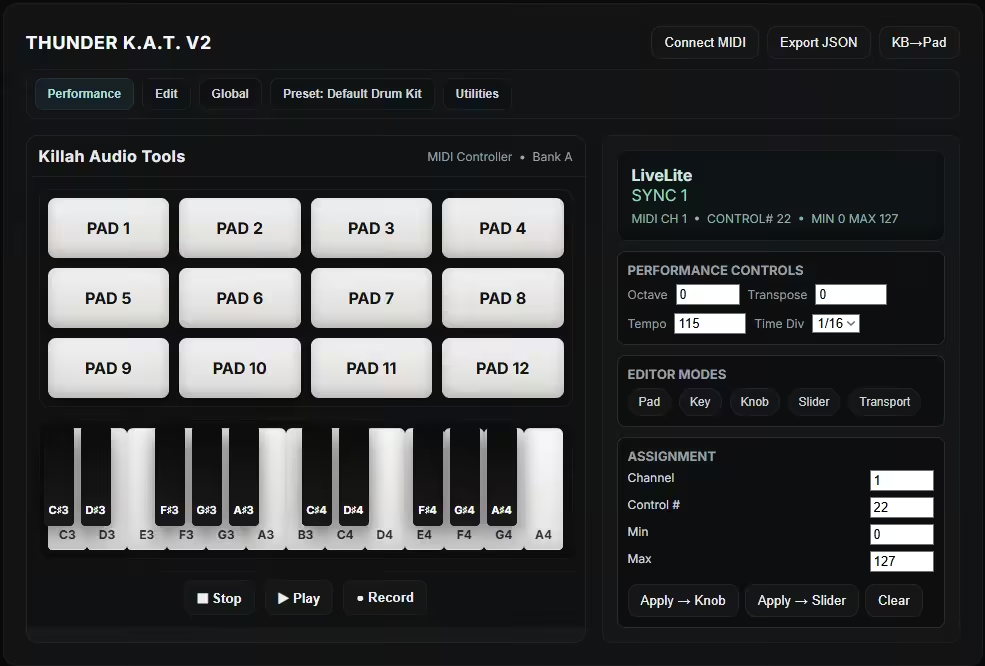
Welcome to Thunder K.A.T. V2, a browser-based demo of the Killah Audio Tools MIDI controller interface. This is a fully functional web simulation that recreates the experience of using professional music production hardware in your browser.
Desktop and Tablets are recommend.
This is a demonstration version while it provides realistic MIDI controller functionality, it runs entirely in your web browser without requiring any special hardware or software installation.
What You Can Do Drum Pad Performance Play 12 velocity-sensitive drum pads with your mouse, keyboard, or MIDI controller
Each pad triggers MIDI notes and can play built-in synth sounds or your imported audio samples
Keyboard mapping: Use keys 1 2 3 4 5 6 7 8 9 0 - = to trigger pads 1-12
Virtual Piano Keyboard Play a 2-octave piano keyboard with realistic key physics and visual feedback
Includes both white and black keys with proper spacing and responsive interaction
Keyboard mapping: Use computer keyboard keys (Z-M for lower octave, Q-U for upper octave)
Complete MIDI Control Connect to real MIDI devices using Web MIDI API
Send and receive MIDI messages in real-time
Map controls to CC messages for knobs, sliders, and transport controls
Performance Features Octave/Transpose: Shift pitch ranges on the fly
Tempo Control: Adjust BPM from 40-240
Time Division: Set rhythmic subdivisions (1/1 to 1/32)
Transport Controls: Play, Stop, Record with metronome
Preset Management Save and load complete configurations
Includes built-in presets (Default Drum Kit, Melody Layout)
Export/import your setups as JSON files
Audio Capabilities Built-in Synthesizer: Plays notes with realistic envelope and tone
Sample Import: Load your own audio files onto pads or the piano
Audio Trimming: Precisely edit start/end points of imported samples
Multi-format Support: Works with various audio file types
Editing & Mapping Edit Mode: Click pads or keys to reassign MIDI notes and parameters
CC Mapping: Assign knobs and sliders to control external gear
Real-time Assignment: Visual feedback for all controller mappings
Advanced Features Recording: Capture your performances as MIDI data or render to WAV
Keyboard Target Switching: Toggle between pad and piano keyboard control
Visual Feedback: Animated LED displays and responsive UI elements
Responsive Design: Works on desktop, tablet, and mobile devices
Getting Started Click the pads or play the keyboard to make sounds immediately
Press Tab to switch between pad and piano keyboard control modes
Connect MIDI devices if you have hardware controllers available
Try Edit Mode to customize pad assignments and mappings
Experiment with presets to explore different configurations
Technical Notes This demo uses modern web technologies including:
Web Audio API for sound generation and processing
Web MIDI API for hardware integration
CSS animations and transitions for realistic visual feedback
Local storage for saving your configurations
No installation required everything runs securely in your browser!