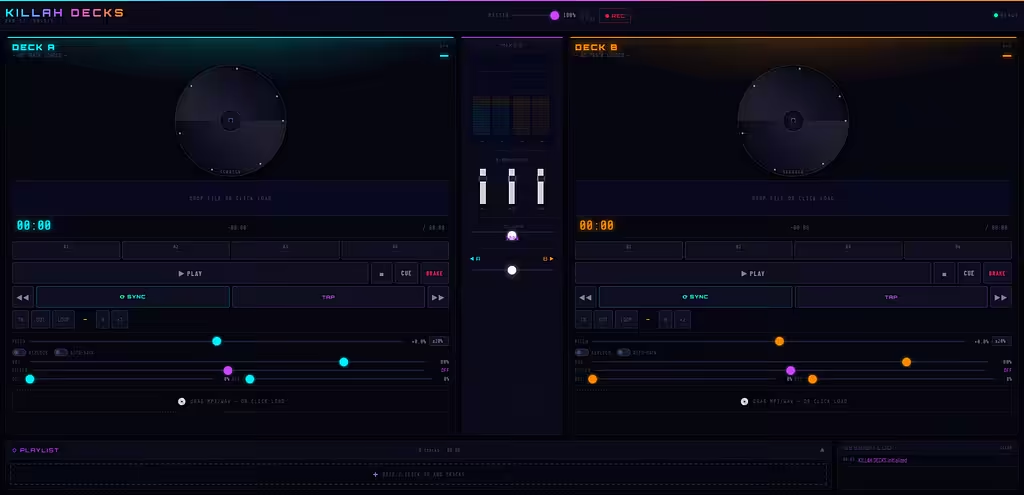
Virtual TKILLAH DECKS is a browser-based DJ console with two decks, real time effects, waveform visuals, vinyl scratching, and a full mixer. No installs, just pure web audio power.
Core Features: Two independent decks with play/pause, stop, cue, and brake. Pitch control (±8% to ±100%), nudge buttons, one-click sync, keylock, and tap tempo.
Scratching: Drag or touch the vinyl to scratch like real turntables. Visual feedback shows active scratching.
Hot Cues: Four programmable cues per deck. Left-click to set/jump, right-click to clear. Each has a unique color marker on the waveform.
Looping: Set loop in/out points, toggle loop on/off, halve or double loop length instantly. Visual overlay shows the loop zone.
Effects & Processing: Filter (low-pass/high-pass morphing), delay, reverb, 3-band EQ (±20dB), master volume with peak meters and clip indicator.
Mixer Section: Crossfader with smooth curve, per-deck volume faders, spectrum analyzer, VU meters with peak hold and dB readout.
Playlist Management: Drag & drop multiple files (MP3, WAV, OGG, FLAC). Load any track to Deck A or B with one click. Visual indicators show active deck assignment. Remove tracks easily. Automatic duration calculation and total runtime.
Recording: Record your entire mix to WebM audio. One click start/stop. Automatically downloads when finished.
Waveform Display: High-resolution waveform with track progress, beat grid overlay (when BPM detected), loop zone, hot cue markers, cue point marker. Click anywhere on the waveform to seek.
BPM & Key Detection: Automatic BPM detection (60–200 BPM range). Musical key detection (C, C#, D, etc. + major/minor) using chroma analysis.
History Log: Session timeline showing track loads, deck assignments, and recording events. Color-coded entries (cyan for Deck A, orange for Deck B, purple for system).
How to Use: Open in any modern browser. Drag an audio file onto a deck or click the load zone. Press Play. Use transport controls, hot cues, loops, and effects. Click REC to record your mix. Use the crossfader to blend between decks.
Keyboard Shortcuts (Desktop): Space/A = play/pause Deck A, L = play/pause Deck B, S/K = stop Deck A/B, D/; = cue Deck A/B, Z/M = sync Deck A/B, F/P = tap tempo, ←/→ = seek -5s/+5s on Deck A.
Responsive Layout: Mobile (<768px) = tab-based with mini transport bar. Tablet (768–1099px) = side by side decks, mixer below. Desktop (1100px+) = three-column layout (Deck A | Mixer | Deck B).
Technical Highlights: Built with HTML5, CSS3, vanilla JavaScript. Web Audio API for real-time DSP. No external dependencies. Zero-latency playback. All processing happens locally. Touch-optimized for mobile DJing.
Made For: Bedroom DJs, mobile performers, producers previewing mixes, anyone who wants to scratch without buying turntables.
KILLAH DECKS, drop a track, hit sync, and let the crossfader do the talking.urntables