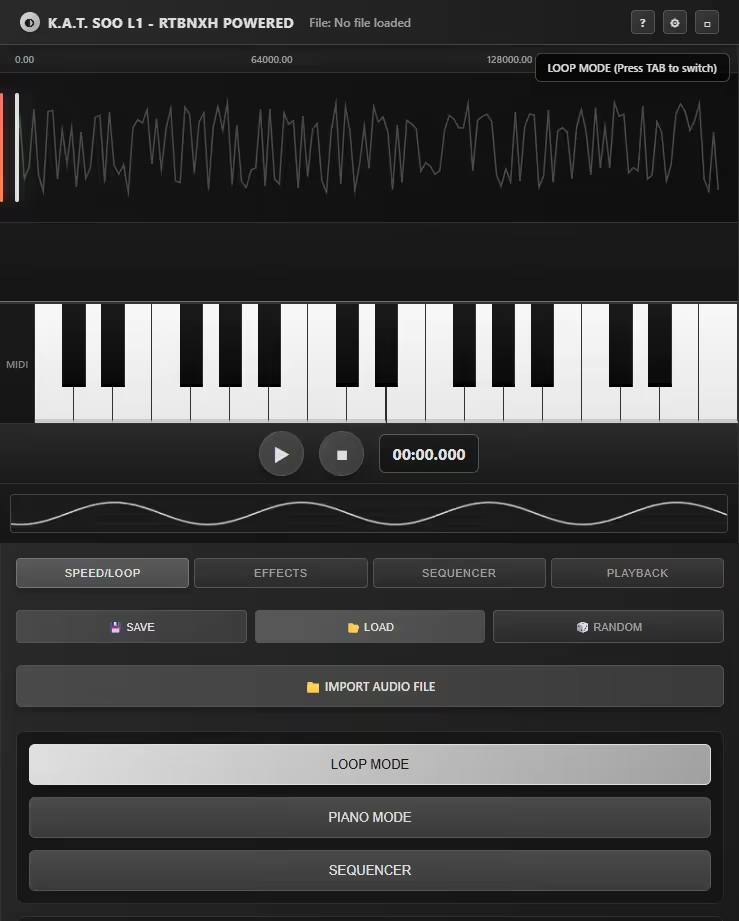
K.A.T. SOO L1 - RTBNXH POWERED A Cool Audio Workstation & Step Sequencer 📱 Device Compatibility ✅ Desktop Recommended - Full functionality with keyboard/mouse support
✅ Android Compatible - Touch-optimized with mobile controls
⚠️ iOS Limited - Some features may be restricted due to browser limitations
🎯 Overview K.A.T. SOO L1 is a professional-grade audio workstation that combines real-time loop manipulation, step sequencing, and advanced audio effects in a sleek, futuristic interface. Whether you're creating electronic music, sound design, or live performance, this powerful tool provides everything you need in a single, intuitive package.
🚀 Key Features 🎵 Core Functionality Real-time Audio Playback - Load and manipulate any audio file (MP3, WAV, OGG)
Loop Manipulation - Dynamic loop points with precise start/end controls
Speed Control - Variable playback speed from 25% to 200%
Step Sequencer - 5-track, 16-step sequencer with individual controls
🎛️ Professional Effects Filter Module - Low-pass, high-pass, band-pass, and notch filters
Reverb - Adjustable size and mix for spatial effects
Delay - Customizable time and feedback parameters
Real-time VU Meters - Visual level monitoring
🎹 Performance Modes Loop Mode - Traditional audio playback and manipulation
Piano Mode - Keyboard-triggered sample playback
Sequencer Mode - Pattern-based step sequencing
📖 How to Use 🎧 Getting Started Enable Audio - Click anywhere on the page to initialize the audio engine
Load Audio - Click "IMPORT AUDIO FILE" to load your main sound source
Basic Playback - Use the PLAY/STOP buttons to control audio playback
🔄 Loop Mode (Default) Speed Control - Adjust playback speed using the SPEED slider (25%-200%)
Loop Points - Use START and LENGTH knobs to define loop regions
Visual Feedback - Watch the playhead move across the waveform display
🎹 Piano Mode Activation - Press TAB key or click "SWITCH TO PIANO MODE"
Keyboard Control:
White keys: A, S, D, F, G, H, J, K, L, ;, '
Black keys: W, E, T, Y, U, O, P
Touch Support - Tap piano keys directly on mobile devices
🥁 Step Sequencer Enable Sequencer - Go to SEQUENCER tab and click "SHOW SEQUENCER"
Load Samples - Click "IMPORT SEQUENCER AUDIO" for each track
Program Patterns - Click steps to activate/deactivate them
Control Playback - Use sequencer-specific PLAY/STOP buttons
Adjust Settings:
BPM: Control sequencer tempo (60-180 BPM)
Track Volume: Individual volume sliders for each track
Mute: Toggle tracks on/off
Pitch/Length: Adjust sample properties per step
⚙️ Advanced Controls Effects Processing Reverb - Add space and depth to your sounds
Delay - Create echo and repetition effects
Filter - Shape frequency content with multiple filter types
Preset Management SAVE - Store current settings as a preset
LOAD - Recall previously saved configurations
RANDOM - Generate random settings for creative exploration
Transport Controls Sync Options - Choose whether sequencer follows main transport
Time Display - Monitor current playback position
Visual Feedback - Real-time spectrum analysis and level meters
🎮 Keyboard Shortcuts TAB - Switch between Loop and Piano modes
A-W-S-E-D-F-T-G-Y-H-U-J-K-O-L-P-;-' - Play notes in Piano mode
📱 Mobile Usage Touch Controls - Optimized for touchscreen interaction
Mobile Mode Buttons - Quick access to different operational modes
Simplified Interface - Adaptive layout for smaller screens
💡 Pro Tips Start Simple - Begin with basic loops before exploring advanced features
Use Presets - Save your favorite configurations for quick recall
Experiment - The RANDOM function can inspire new creative directions
Layer Sounds - Combine multiple sequencer tracks for complex rhythms
Monitor Levels - Keep an eye on the VU meters to avoid clipping
🔧 Technical Notes Web Audio API - Powered by modern browser audio capabilities
Tone.js - Professional-grade audio processing library
Local Storage - Presets and patterns saved in your browser
Responsive Design - Adapts to different screen sizes and orientations
🆘 Troubleshooting No Audio - Click anywhere on the page to enable audio context
File Loading Issues - Try different file formats (MP3, WAV, OGG)
Performance - Close other browser tabs for better performance
Mobile Limitations - Some iOS devices may have restricted audio functionality
🎵 Creative Applications Music Production - Create beats and manipulate samples
Live Performance - Real-time control for DJ sets and live acts
Sound Design - Experiment with audio manipulation and effects
Education - Learn about audio processing and sequencing concepts
K.A.T. SOO L1 - RTBNXH POWERED brings professional audio workstation capabilities to your browser, combining powerful features with an intuitive interface designed for both beginners and experienced producers.