ghost.js
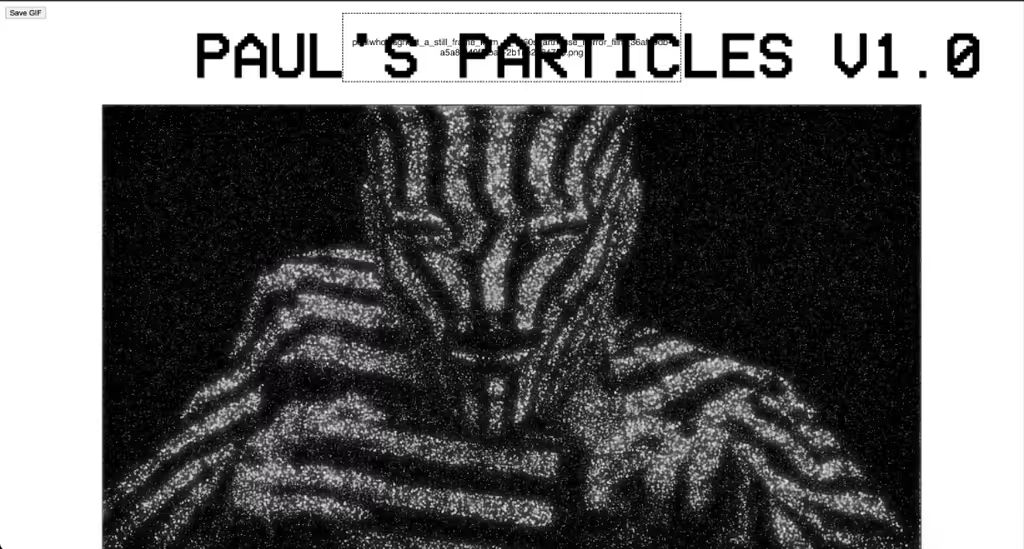
I tried my hand at coding my own custom mosh type app that takes an image input and breaks it down input 10 levels, a sort of posterization process. It then places the particles on the canvas in layers alternating lighter and darker to create larger base layer particles, as well as shadow layers and highlight layers. The particles constantly move independently following tight random looping paths, but because they are constrained to a certain distance from their starting point they create a shifting and lineless variation of the input image.
Some notes on use:
-
This is the first stable version that I have made that uses an input prompt rather than a set image for input. There will be issues.
-
The UI is terrible... I know... super basic... make your own.
-
The larger your image, the less dense the particles will be because there is a limit to the number of each particle type. The smaller your image, the more condensed the particles will be forced to become. I have found that images between 1080 and 1920 in size have given the best results, but please prove me wrong.
-
This thing is slow AF... It takes about 5-10 minutes to create a 2.5 second gif. It is not a feat of coding wonder by any means.... its a low effort tool to transform photos and ai outputs into something more bendable to my will in my video workflows. I am sharing it so others can use and maybe expand on it. Steal it, make it better, make a profit using it and selling your better version, rub it in my face.... please.
-
The output size of the gifs will vary. I tried to tame it, but part of what I like about it is that its output size is based on the radness of the gif. More interesting and dynamic gifs will have a higher file size. In my tests, 4/5 were within objkt minting size though.
-
HIGH CONTRAST IMAGES WILL HAVE THE BEST RESULTS. COLORFUL IMAGES WILL BECOME MUDDY. prove me wrong, please.
Future versions not promised, but if they occur they will focus on a better ui and faster processing, as well as slider controls for particle size and count of each layer.